
Types of Unicode Characters for Invisible Text (With Examples)
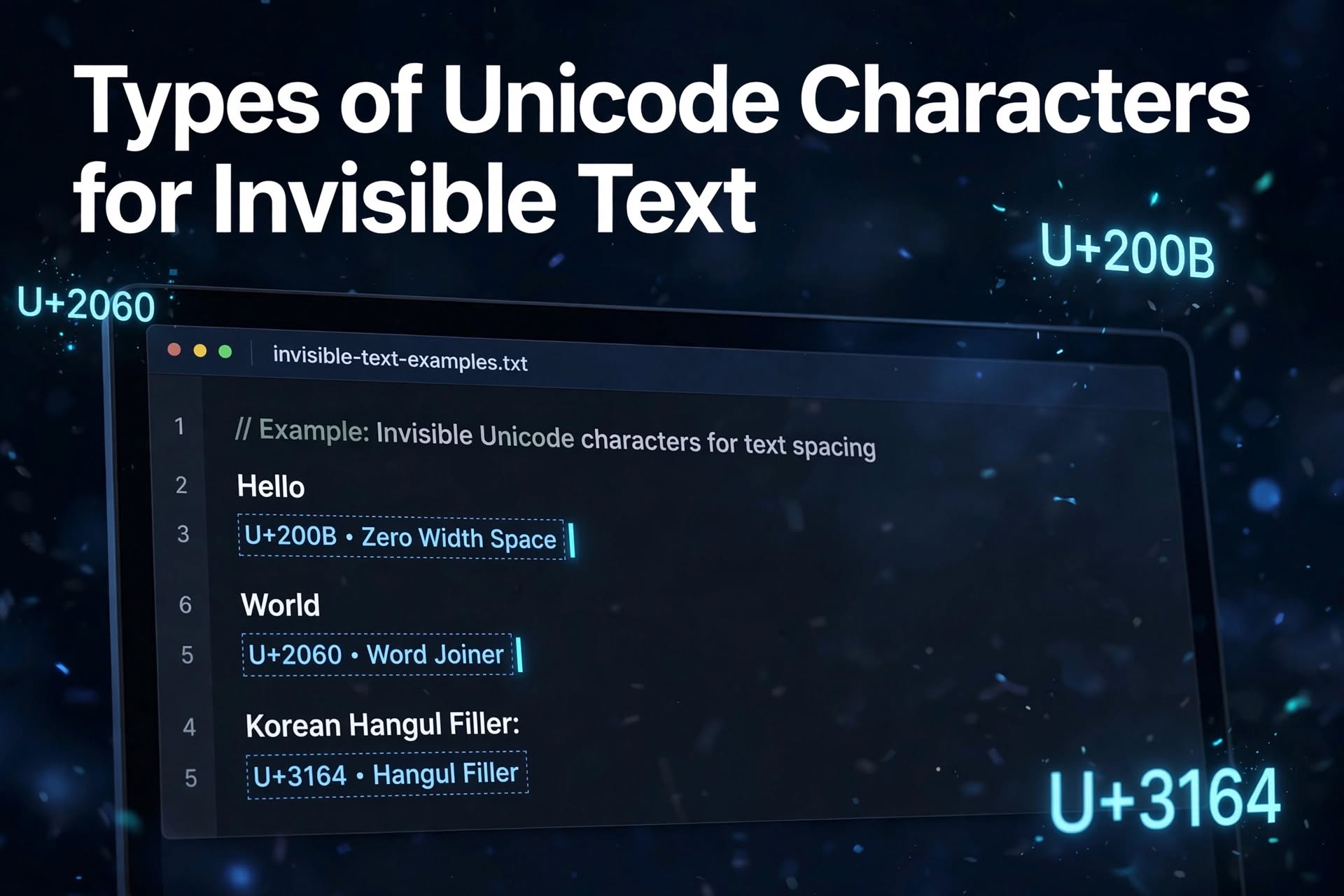
Invisible text consists of Unicode characters that may not appear visibly on the screen but can still be recognized and processed by computers. These characters are often used to create blank-looking text, insert invisible separators, or control how text is displayed.
Unlike an ordinary space created with the spacebar, some invisible Unicode characters have special formatting or text-processing functions. However, not every invisible character works in every app or platform. Some may be removed, ignored, or displayed differently depending on the software.
In this guide, we will explore five Unicode characters commonly associated with invisible text, explain how they work, and show you how to copy them using online Unicode websites or an invisible text generator.
5 Types of Unicode Characters for Invisible Text
Here are five Unicode characters that can be used for invisible text or related text-formatting purposes.
1. U+200B — Zero Width Space
The Zero Width Space (U+200B) is a Unicode character that has no visible width. It can provide an invisible break opportunity within a line of text without adding a conventional space.

This character is commonly used in text processing and formatting. Depending on the platform, it may also be used to create blank-looking text.
How to Copy Zero Width Space
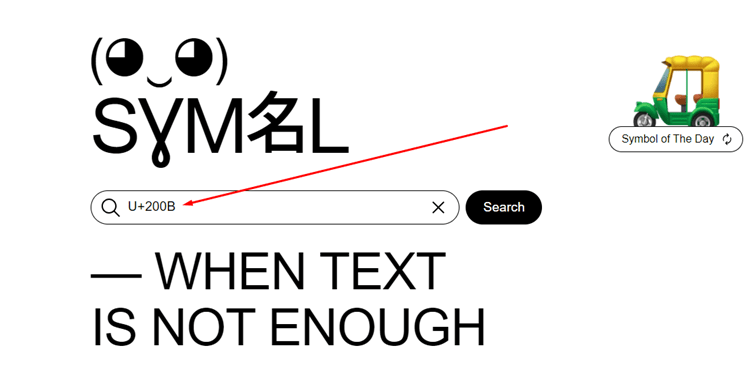
You can use a Unicode reference website such as Compart or Symbl to find the character.
Follow these steps:
- Open Compart or Symbl in your browser.
- Search for the Unicode code U+200B or the name “Zero Width Space.”
- Open the matching character entry.
- Use the website’s copy option, if available, to copy the character.
- Paste it into a text editor or another application to test it.
The character may appear blank after you paste it. That is expected because it has no visible width.

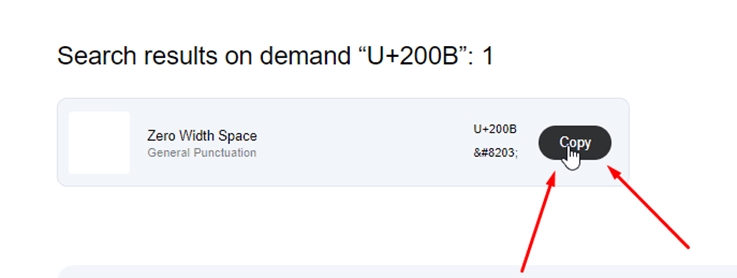
Keep in mind that some applications remove zero-width characters or treat them differently, so test it in the destination where you intend to use it.
2. U+2060 — Word Joiner
The Word Joiner (U+2060) is another invisible Unicode formatting character. Its primary purpose is to prevent a line break at its position, keeping the surrounding text together.
Although it is invisible during normal display, it is not simply an ordinary blank space. Its behavior differs from that of a Zero Width Space.
How to Copy Word Joiner

You can find this character using a Unicode reference website.
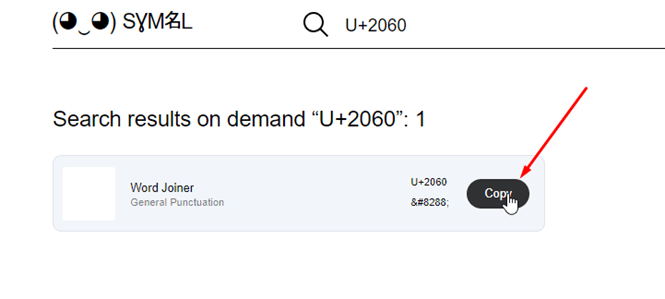
- Visit Compart or Symbl.
- Search for U+2060 or “Word Joiner.”
- Open the corresponding character entry.
- Copy the character using the available copy function.
- Paste it into a text editor to check how it behaves.
Word Joiner is mainly intended for controlling line-breaking behavior. If your goal is to create blank-looking text, remember that its effect depends on the application and the surrounding characters.
3. U+3164 — Hangul Filler
The Hangul Filler (U+3164) is a Unicode character associated with the Hangul writing system. In many fonts and applications, it can appear blank or nearly invisible, which is why it is sometimes used to create invisible-looking text.
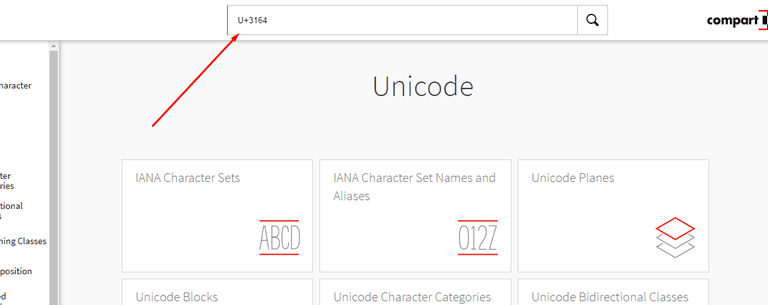
Unlike Zero Width Space and Word Joiner, Hangul Filler is not a zero-width formatting character. Its display and spacing behavior depend on the font and rendering environment.
How to Copy Hangul Filler
Follow these steps:
- Open Compart or another Unicode character reference website.
- Search for U+3164 or “Hangul Filler.”
- Open the character entry.
- Select the displayed character or use the site’s copy feature.
- Press Ctrl+C on Windows or Cmd+C on macOS if you selected the character manually.
- Paste it into your desired application.
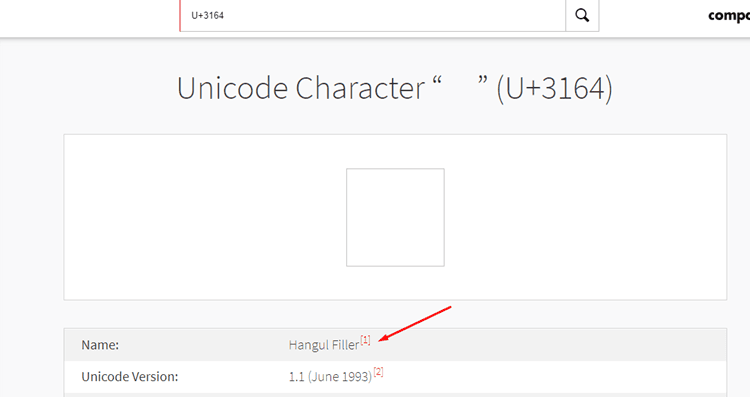
If the character appears blank, it may have been copied successfully. You can paste it into a text editor or the target app to check whether it is preserved.

Because Hangul Filler can behave differently from zero-width characters, it is worth testing it before relying on it for a particular purpose.
4. U+2062 — Invisible Times
The Invisible Times (U+2062) character is a Unicode formatting character associated with mathematical notation. It represents an invisible multiplication operator, allowing multiplication to be indicated without displaying a conventional multiplication symbol.
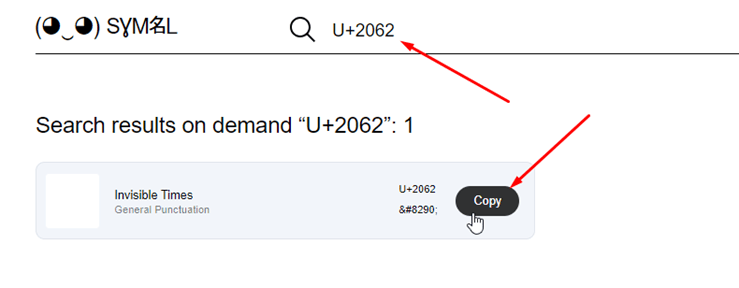
For example, mathematical notation sometimes expresses multiplication by placing terms next to each other. Invisible Times provides a character that can represent that relationship in text.
How to Copy Invisible Times
To find and copy this character:
- Visit a Unicode reference website such as Compart or Symbl.
- Search for U+2062 or “Invisible Times.”
- Open the matching character entry.
- Copy the character using the website’s copy option.
- Paste it into a text editor to test it.
Although the character is invisible during ordinary display, its intended function is mathematical formatting rather than creating a conventional blank space.
Some applications may preserve it, while others may remove it or handle it differently.
5. U+FEFF — Zero Width No-Break Space
The U+FEFF character is historically known as the Zero Width No-Break Space. In older text-processing contexts, it was used to prevent line breaks between adjacent characters.
Today, its use as a word-joining character has largely been superseded by U+2060. U+FEFF is also widely associated with the byte order mark (BOM), which can appear at the beginning of encoded text to help identify its encoding.
This means that U+FEFF should not always be treated as a general-purpose invisible space. Its behavior depends on where it appears and how the software processes it.
How to Copy U+FEFF
If you need to examine this character, follow these steps:
- Open Symbl or Compart.
- Search for U+FEFF or “Zero Width No-Break Space.”
- Open the matching Unicode entry.
- Use the copy option if the website provides one.
- Paste the character into a text editor and check how it is handled.
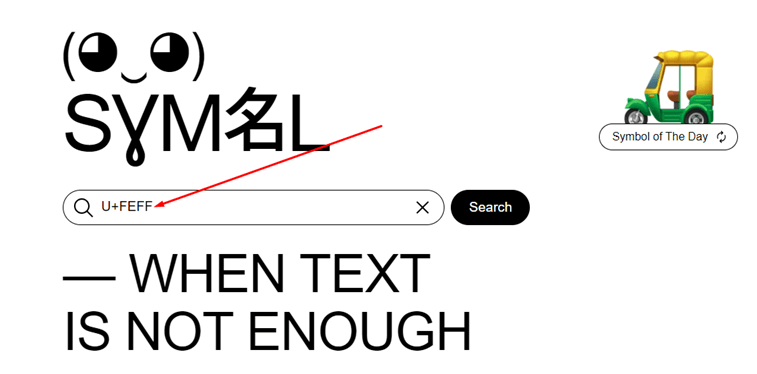
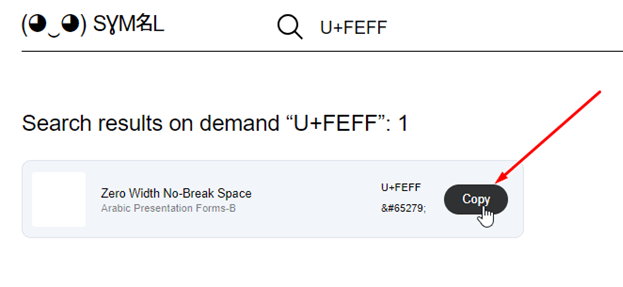
Be aware that some programs may interpret U+FEFF as a byte order mark, particularly at the beginning of a file, rather than as ordinary text.
These five characters have different purposes. If you only want a blank-looking character, test the result in your target application before using it.
Is There Another Method Besides Using Unicode Characters for Invisible Text?
Yes. If you do not want to search for individual Unicode codes, you can use an online invisible text generator.
These tools provide a convenient way to copy invisible or blank-looking characters without manually locating their Unicode entries.
For example, you can try the Editpad Invisible Character Tool.
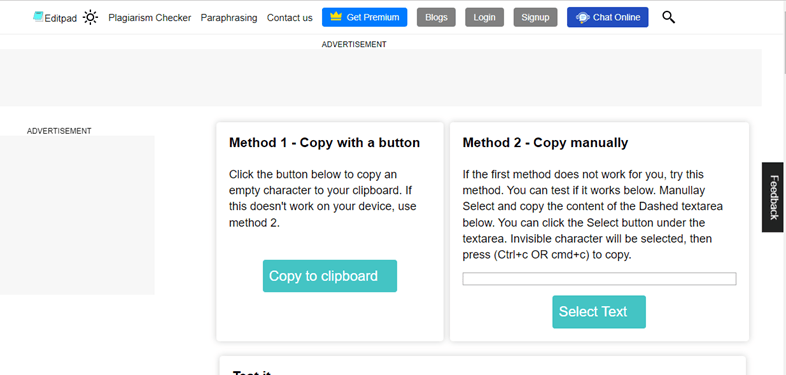
How to Use an Invisible Text Generator
- Open the invisible character generator in your browser.
- Review the available options for creating or copying invisible text.
- Use the copy button if the tool provides one, or select the character manually.
- Paste the copied content into your intended application.
- Test it to confirm that the application preserves the character.
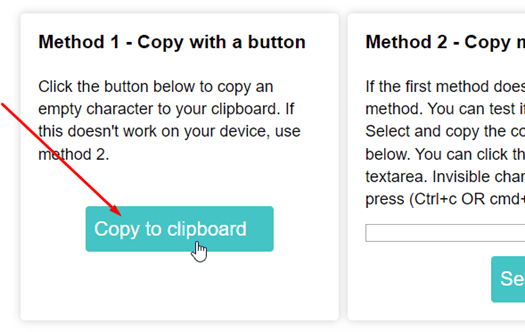
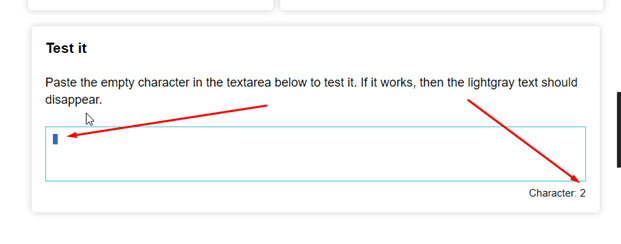
Some tools also provide a testing field where you can check whether the copied character is present, even if it cannot be seen.
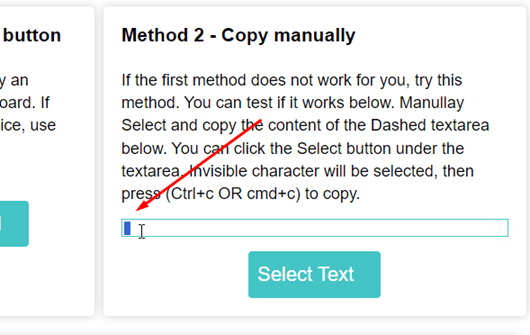
An online generator can save time, especially if you do not know the Unicode code for a particular character. However, the tool cannot guarantee that every app, website, or messaging platform will accept or preserve the character.
How to Check Whether Invisible Text Has Been Copied Correctly
Invisible characters can be difficult to verify because they may not produce any visible change on the screen.
Here are a few practical ways to test them:
- Paste into a plain-text editor: Check whether the character is preserved after pasting.
- Inspect the Unicode code point: Use a Unicode-aware text inspector to confirm which character is present.
- Check the character count carefully: Some invisible characters count as code points, while other tools may count text using different rules.
- Test the destination app: The most important test is whether the platform where you want to use the character preserves it.
- Avoid relying only on visual appearance: A blank-looking result does not necessarily mean that a character was copied successfully.
Remember that Unicode characters may be treated differently by different programs. A character that works in one application might be removed or interpreted differently in another.
Frequently Asked Questions About Invisible Unicode Characters
What Is an Invisible Unicode Character?
An invisible Unicode character is a character or formatting code that does not normally produce a visible symbol when rendered. Examples include Zero Width Space (U+200B) and Word Joiner (U+2060).
Which Unicode Character Is Used for Invisible Text?
Zero Width Space (U+200B) is one commonly used character for invisible text. However, the best option depends on the purpose and the application in which you intend to use it.
Is Zero Width Space the Same as a Normal Space?
No. A normal space occupies visible horizontal space and separates words. Zero Width Space has no visible width and is primarily intended to provide a line-break opportunity.
Can Invisible Characters Be Counted?
Yes. Invisible characters may be counted by software even though they are not visibly displayed. The result depends on whether the tool counts Unicode code points, grapheme clusters, bytes, or another unit.
Why Does Invisible Text Sometimes Stop Working?
An application may remove invisible characters, normalize the text, restrict certain Unicode characters, or display them differently. Copying a character successfully does not guarantee that every platform will preserve it.
Are Invisible Unicode Characters Safe to Use?
They can be useful for legitimate formatting and text-processing tasks. However, invisible characters can also make text confusing or conceal unexpected content. Use them responsibly, particularly in usernames, documents, source code, and shared messages.
Conclusion
Invisible Unicode characters can help with text formatting and other specialized tasks, but different characters serve different purposes. In this guide, we explored five examples: Zero Width Space (U+200B), Word Joiner (U+2060), Hangul Filler (U+3164), Invisible Times (U+2062), and Zero Width No-Break Space (U+FEFF).
You can find these characters through Unicode reference websites such as Compart and Symbl, or use an online invisible character generator such as Editpad to make copying easier.
The important thing to remember is that invisible does not mean identical. Each Unicode character has its own behavior, and compatibility varies across applications. Choose a character based on your intended use and test it in the destination before relying on it.
You may also like ...